POCO Pad X1 User Experience
Sizometry Verdict
Editorial scores based on recurring themes across professional reviews, hands-on testing, and expert analysis.
Overall user experience
8.0
out of 10
A compelling midrange tablet pairing a sharp 11.2-inch 3:2 144Hz display, capable Snapdragon 7+ Gen 3 performance, and practical 45W charging near $399 launch pricing, held back mainly by face-unlock-only security, separately sold productivity accessories, younger long-term owner data, and regional availability gaps.
Category scores
Camera
7.0
13 MP rear improves scanning utility; still not an imaging priority for tablet buyers.
Battery and charging
7.5
8850mAh solid for daily use with excellent 45W recovery; trails Pad M1 marathon stamina.
Performance
8.0
Snapdragon 7+ Gen 3 smooth for study and moderate gaming; warmth under heavy sustained loads.
Handling and portability
6.0
500 g manageable for brief tasks; tall 3:2 canvas exceeds sustained one-hand comfort. Backpack-friendly rather than pocketable, typical for 11-inch productivity tablets.
Build quality
8.0
Slim 6.18 mm chassis and premium-feel specs for POCO pricing; no fingerprint or IP rating.
Value
8.0
A compelling midrange tablet pairing a sharp 11.2-inch 3:2 144Hz display, capable Snapdragon 7+ Gen 3 performance, and practical 45W charging near $399 launch pricing, held back mainly by face-unlock-only security, separately sold productivity accessories, younger long-term owner data, and regional availability gaps.
Strengths
- Outstanding display and chipset value for midrange tablet pricing
- 45W charging and Wi-Fi 6E feel modern versus Redmi budget alternatives
- 3:2 144Hz canvas elevates reading and split-screen productivity
Weaknesses
- Accessories and biometrics cost extra mental and financial overhead
- Mixed reports stem from limited long-term ownership and spotty regional retail
- Battery capacity smaller than Pad M1 for couch marathon streamers
Best for
- Productivity-minded students wanting 3:2 sharpness without iPad money
- Xiaomi ecosystem households prioritizing HyperOS interconnect
- Buyers who treat fast charging as a daily quality-of-life feature
Less suitable for
- Marathon battery shoppers who prioritize 12000mAh over chipset speed
- Users demanding fingerprint unlock and bundled keyboard docks
- Markets where import pricing erodes POCO value proposition
Upgrade recommendation
Current device: Redmi Pad or Pad SE
Recommendation: Strongly recommendedNotes: 3:2 144Hz display, Snapdragon 7+ Gen 3, 45W charging, and Wi-Fi 6E address core midrange tablet gaps.
Current device: Pad M1 (productivity focus)
Recommendation: Worth consideringNotes: Meaningful gains in aspect ratio, refresh, and silicon if 8850mAh endurance suffices.
Current device: Pad X1 (satisfied)
Recommendation: Probably unnecessaryNotes: Incremental jump unless Pad M1 battery or flagship OLED tablets personally matter.
Current device: Need maximum battery and microSD
Recommendation: Depends on prioritiesNotes: Pad M1 adds 12000mAh tank, microSD, and reverse charging at the cost of slower silicon.
Current device: Xiaomi Pad 7 cross-shopper
Recommendation: Depends on prioritiesNotes: Parallel hardware cousins — choose POCO or Xiaomi based on regional pricing and ROM preference.
Bottom line
The POCO Pad X1 earns respect as one of the clearest midrange productivity values in POCO's tablet lineup — 3:2 144Hz sharpness, Snapdragon 7+ Gen 3, 45W charging, and Wi-Fi 6E in a 500 g body that fits real student backpacks. Dominant tradeoffs are face unlock only, accessory spend for pen and keyboard workflows, and thinner long-term owner data than established Redmi lines. Want maximum battery and microSD? Cross-shop Pad M1. Want mature global retail everywhere? Verify local POCO availability before committing.
See its real size next to another phone or tablet.
Open size comparisonOverview
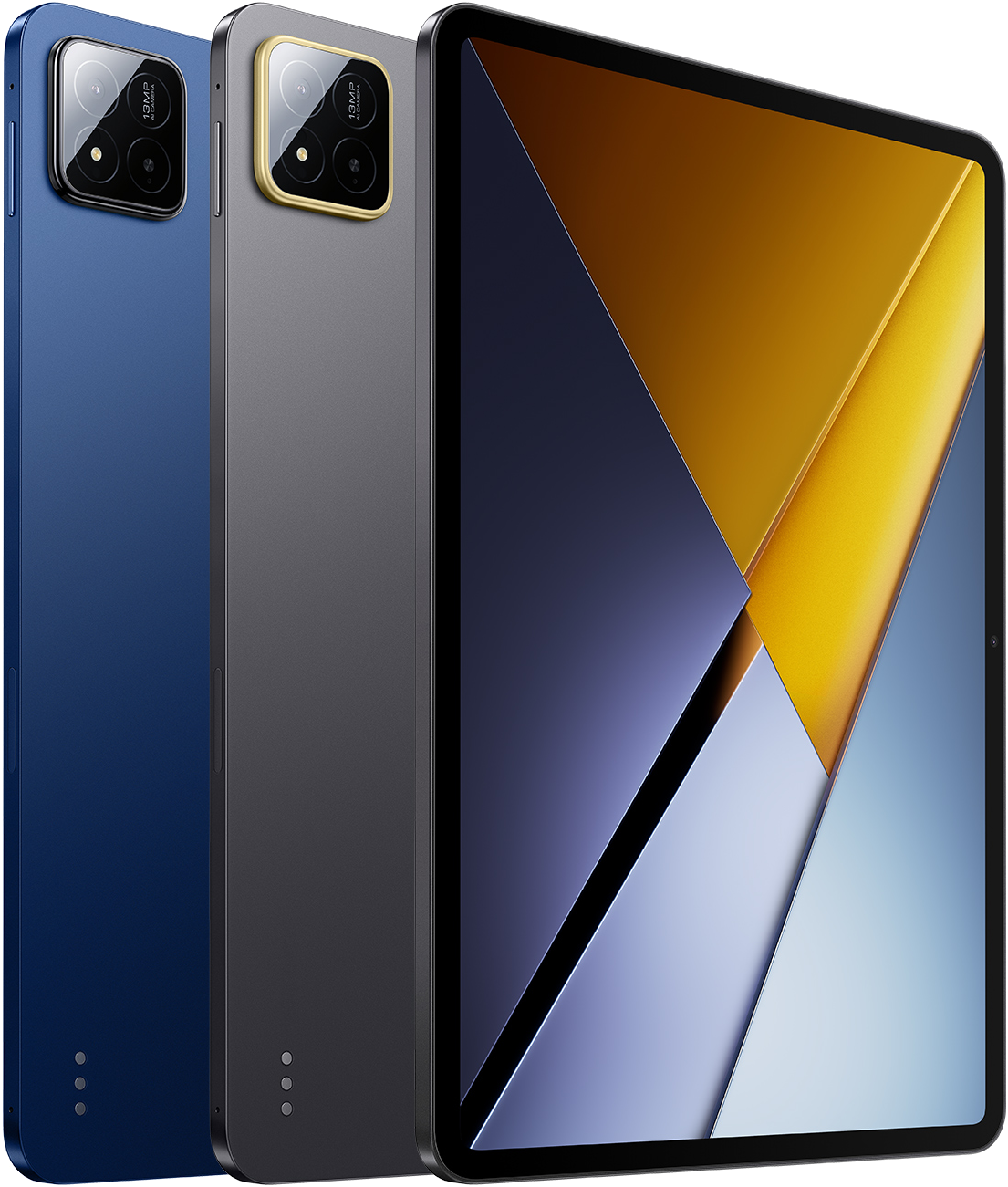
Since the November 26, 2025 global debut alongside the POCO F8 Series, the Pad X1 is widely regarded as POCO's productivity-leaning midrange tablet — an 11.2-inch 3:2 slab that pairs Snapdragon 7+ Gen 3 headroom with a tall high-resolution panel, 45W recovery on an 8850mAh cell, and HyperOS polish at a $399 launch bracket.
This summary focuses on real global HyperOS ownership where the Pad X1 has shipped — lap balance on a 3:2 canvas, Wi-Fi 6E home habits, USB 3.2 file transfers, accessory ergonomics, and value versus Pad M1 stamina or Xiaomi Pad 7 cross-shopping.
Daily use
In daily use, the Pad X1 is consistently described as smooth for routine workloads on Snapdragon 7+ Gen 3 with HyperOS 2 or early HyperOS 3 builds over Android 15 and Android 16 tracks. App launches, messaging, navigation, and social feeds run without the compromise budget Helio tablets exhibit during split-screen research or moderate gaming.
The 11.2-inch 3:2 panel makes the Pad X1 feel more document-friendly than 16:10 couch tablets for daily reading and browser work. Scrolling remains fluid at 144Hz, outdoor legibility benefits from 800 nits peak claims in review testing, and split-screen note-taking beside PDFs works for student stacks on 8GB LPDDR5X RAM.
HyperOS receives mixed credit for tablet windowing — floating windows, reading mode, and wet-touch support — alongside first-week bloat cleanup typical of Xiaomi global builds. The 500 g weight and 6.18 mm profile feel balanced in landscape for couch viewing; many owners adopt slim cases quickly for grip on matte finishes.
Pad X1
View the full specifications, dimensions, pricing, and related models.
Camera
Camera feedback centers on utility rather than photographic ambition. The 13 MP rear and 8 MP front sensors handle document scanning, whiteboard capture, and desk-propped video calls — the workloads students and remote workers actually need from a midrange tablet.
Buyers rarely choose the Pad X1 for imaging; low light trails modern phones. Classroom snapshots and recipe captures land as good enough; creative photography redirects to phones without surprise.
Battery and charging
Typical study and home days end with reserve for moderate use on the 8850mAh cell: lectures, notes, browsing, intermittent streaming, and split-screen research. Heavy outdoor brightness, long video marathons, or gaming evenings push bedtime top-ups but rarely midday panic for many early owners — though absolute stamina trails Pad M1's 12000mAh headline.
Forty-five-watt charging is a clear daily win versus Redmi Pad 2-class recovery — brief desk sessions add meaningful range and full top-ups land in roughly ninety minutes in review testing. Owners adapt to between-class habits; upgraders from 18W budget slabs describe this as one of the clearest quality-of-life gains.
Performance
App launches, HyperOS animations, and split-screen browsing feel smooth for Pad X1 expectations on Snapdragon 7+ Gen 3 and the 144Hz panel — a clear step up from Snapdragon 7s Gen 4 Pad M1 hardware and Helio budget Redmi tablets.
Multitasking pairs — notes beside PDF, browser beside video — resume reliably for student workflows on 8GB LPDDR5X; absence of fingerprint unlock pushes PIN or face security without broader lag complaints. UFS 4.0 on 256GB and 512GB SKUs feels snappy during large app installs versus UFS 2.2 budget tiers.
Handling and portability
At 173.42 mm wide, 251.22 mm tall, and 500 g, the POCO Pad X1 sits in the conventional 11-inch band for brief handheld sessions.
The POCO Pad X1 does not fit jacket or jeans pockets. Portability means daypacks, school bags, and messenger carriers where 251.22 mm height slides beside laptops and notebooks more easily than 12-inch stamina slabs.
For extended reading, note-taking, and streaming, the Pad X1 is comfortable for forty-five-to-ninety-minute sessions when propped on a lap, pillow, or stand. The half-kilogram weight reduces forearm fatigue compared with 610 g Pad M1, though neck angle still benefits from a kickstand case during long desk marathons on the tall 3:2 canvas.
Build quality
At 500 g and 6.18 mm thin, the Pad X1 chassis feels premium for POCO tablet pricing — stiff enough for daily backpack carry, precise volume buttons, and a flat back that mates with the Floating Keyboard accessory. Normal flex rarely troubles student carriers in early reviews.
Display durability follows familiar tablet patterns; film or cases remain common. Matte finishes hide fingerprints reasonably. There is no IP rating emphasis in ownership talk — buyers treat it as an indoor productivity and media device.
Similar size devices
This summary is based on recurring reports from public discussions.