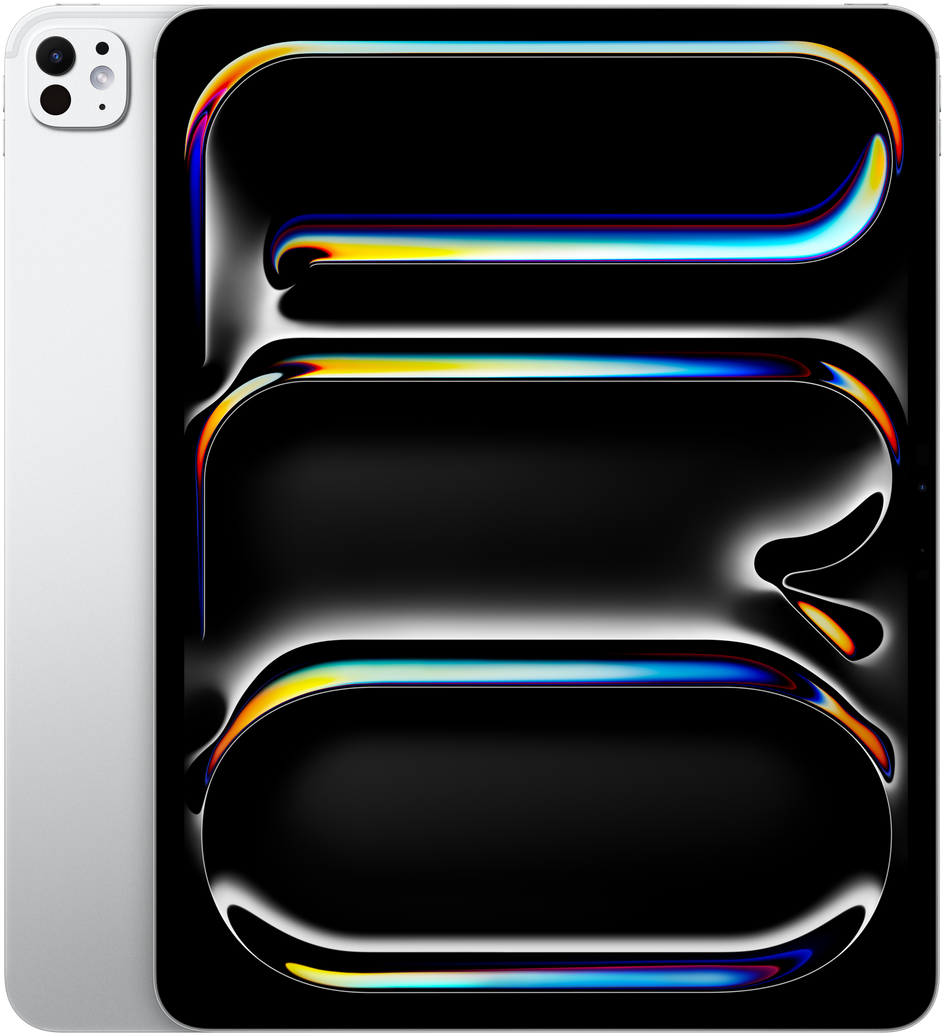
Official manufacturer render.
Apple
iPad Pro 13 M4
- 13-inch Ultra Retina Tandem OLED
- Apple M4 · 9-core CPU
- 579 g
- From $1,299
Available colors
Selected: Silver
Physical specifications
13"
Display size
579 g
Weight
281.6 mm
Height
215.5 mm
Width
5.1 mm
Thickness
4:3
Aspect ratio
Release and pricing
- Announced
- May 7, 2024
- Released
- May 15, 2024
- Starting price
- $1,299
- Market
- US
- Configuration
- 256 GB Wi‑Fi
Display
- Display size
- 13"
- Display technology
- Ultra Retina Tandem OLED
- Resolution
- 2752 × 2064
- Refresh rate
- 120 Hz
- Peak brightness
- 1600 nits
- Protection
- Fingerprint-resistant oleophobic coating
Performance
- Chipset
- Apple M4
- CPU
- 9-core CPU
- GPU
- 10-core GPU
- RAM
- 8 GB, 16 GB
- Storage
- 256 GB, 512 GB, 1024 GB, 2048 GB
- Expandable storage
- No
Cameras
- Rear cameras
- Wide · 12 MP · ƒ/1.8
- Front cameras
- Landscape · 12 MP · ƒ/2.4
- Video recording
- 4K video recording at 24, 25, 30, or 60 fps
Build & durability
- Frame
- Aluminum
- Back
- Aluminum
- Ingress protection
- None published
Connectivity
- Cellular
- Wi‑Fi, Wi‑Fi + Cellular (5G)
- Wi‑Fi
- Wi‑Fi 6E (802.11ax)
- Bluetooth
- Bluetooth 5.3
- USB
- Thunderbolt / USB 4
- NFC
- No
- eSIM
- Yes
Sources and measurement notes
Sizometry compares published specifications and calculates differences. These are not hands-on measurements or tests of comfort, performance or pocket fit.
Check the exact model, year, region and configuration on the linked page. References may cover several variants. Folded and unfolded dimensions differ; cases and camera protrusions may change the space a device needs. Drawings share a relative scale and are not calibrated to life size on your screen.
Sizometry Analysis
Overall Score
9.0
out of 10
A stunning large-format creative tablet whose tandem OLED workspace and lighter chassis redefine the 13-inch pro category, tempered by accessory costs, single-port hub life, and persistent iPadOS workflow ceilings for some professions.
Category scores
Camera
6.5
Functional document and meeting cameras for tablet workflows without competing as a primary imaging tool.
Battery and charging
7.5
Capable mixed-use endurance despite larger panel draw, with faster drain under external displays and max brightness creative sessions.
Performance
9.0
Fast routine use with occasional warmth under sustained load.
Handling and portability
6.0
Manageable daily carry with familiar reach and pocket trade-offs for the size class.
Build quality
8.5
Remarkable thin large-format craftsmanship with nano-texture option; sleeve or case recommended for commute peace of mind.
Value
7.5
Balanced capability for the price with deliberate omissions versus higher tiers.
Strengths
- Class-leading large tandem OLED workspace for visual professionals
- Lighter handling than prior 12.9-inch generations expected
- Credible lap typing with updated Magic Keyboard
- M4 power for demanding creative and external-display workflows
Weaknesses
- Limited one-handed and casual portability versus smaller tablets
- Single USB-C port and hub dependency for pro desks
- High all-in cost with Pencil Pro and keyboard
- iPadOS gaps for some macOS-dependent careers
Best for
- Creative professionals needing maximum on-device canvas
- Upgraders from 12.9-inch iPad Pro seeking OLED and lighter body
- Lap typists and meeting-heavy knowledge workers at tablet-first desks
- Glare-sensitive office users choosing nano-texture glass
Less suitable for
- Minimalist travelers prioritizing smallest pro carry footprint
- Casual media consumers unlikely to use Pencil or keyboard
- Users needing frequent one-handed portrait interaction
- Developers and analysts requiring macOS-native tooling daily
Upgrade recommendation
Current device: iPad Pro 12.9-inch M1 or older
Recommendation: Strongly recommendedNotes: OLED tandem display, meaningful weight reduction, M4 speed, and Pencil Pro features address the clearest large-iPad pain points.
Current device: iPad Pro 12.9-inch M2
Recommendation: Worth consideringNotes: Strong for OLED and handling seekers; optional for satisfied M2 owners with current accessories.
Current device: iPad Pro 11-inch M4
Recommendation: Depends on prioritiesNotes: Upsize when canvas, lap typing, and split-view creative timelines matter more than handheld portability.
Current device: iPad Air 13-inch M2 or M3
Recommendation: Depends on prioritiesNotes: Justified for HDR OLED, 120Hz pro motion, Pencil Pro, and nano-texture needs; less so for light reading-only use.
Current device: MacBook Pro 14-inch as only computer
Recommendation: Worth consideringNotes: Excellent creative companion; full Mac replacement only for narrowly iPad-native professions.
Everyday usability
Estimated from device dimensions and weight.
Handling
Two-handed preferredTwo-handed use is generally the more natural way to hold this device.
Bag portability
LimitedNot intended for pocket carry; plan on a bag, sleeve, or hand carry.
Carry comfort
BalancedWeight sits in a balanced range for everyday holding and carrying.
Reading and media
One of the largest formats for media and productivity on a tablet.
Gaming
High-endIts processor and graphics hardware are suited to demanding games and higher visual settings.
Bottom line
The iPad Pro 13-inch M4 is the large canvas many visual professionals waited for — OLED brilliance, M4 speed, and a body lighter than old 12.9-inch expectations combine into a mobile studio that finally feels willing to travel. Magic Keyboard lap credibility and Pencil Pro precision make all-day creative and writing sessions plausible without constantly reaching for a MacBook. Trade-offs are explicit: this is not a one-handed couch tablet, bag bulk exceeds 11-inch life, and single-port hub planning is part of ownership. Buyers who live in illustration, editing, markup, and mobile typing at scale will find the size essential; buyers who mainly consume media or want the lightest pro kit should look smaller unless workspace is non-negotiable.
Models and configurations
- Storage
- 256 GB512 GB1 TB2 TB
- Connectivity
- Wi‑FiWi‑Fi + Cellular (5G)
- Colors
- SilverSpace Black
- RAM
- 8 GB16 GB
- SIM configuration
- eSIM
Compare this device at its real-world size.
Use the Sizometry Tool to compare dimensions, thickness, and weight with other devices.
Open Tool →